
Quick Menu Customization
You can change the items to display on the Quick menu and their order to suit your preferences.
For information about Quick menu operation methods ( Quick Menu)
Register to the Quick Menu
Change the menus to be displayed in the Quick menu.
These can be set separately for [ ] mode and for [
 ]/[S&Q] mode.
-
Select [Q.MENU Settings].


 [
[ ] [
] [ ] [Q.MENU Settings] [Item Customize (Photo Mode)]/[Item Customize (Video/S&Q Mode)]
-
Select the item position (1 to 12).
Press 


 to select the position and then press .
Selection is also possible by rotating  .
.
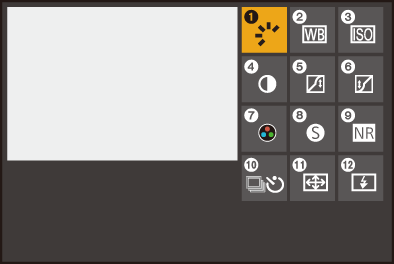
-
Find the function to register.
Rotate  to select the sub tab where the function to register is categorized (Menu Items That Can Be Registered) and then press .
You can also select by pressing to select the sub tab, pressing or rotating , and then pressing .
Switch the [1] to [3] tabs by pressing [Q].
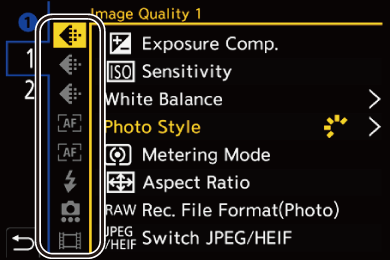
-
Register menu items.
Press to select an item and then press .
Selection is also possible by rotating .
 Select items with [>] by selecting the item again.
 Menu Items That Can Be Registered
[1] tab
 [Image Quality]
[Exposure Comp.] (Exposure Compensation)
[Sensitivity] (ISO Sensitivity)
[White Balance] (White Balance (WB))
[Photo Style] ([Photo Style])
[Metering Mode] ([Metering Mode])
[Aspect Ratio] ([Aspect Ratio])
[Rec. File Format(Photo)] ([Rec. File Format(Photo)])
[Switch JPEG/HEIF] ([Switch JPEG/HEIF])
[JPEG/HEIF Picture Quality] ([JPEG/HEIF Picture Quality])
[HEIF Format] (HLG Recording (HEIF Format))
[Picture Size] ([Picture Size])
[Long Exposure NR] ([Long Exposure NR])
[Min. Shutter Speed] ([Min. Shutter Speed])
[Soft Skin Effect] ([Soft Skin Effect])
[i.Dynamic Range] ([i.Dynamic Range])
[Filter Effect] ([Filter Settings])
[Exposure Control(Photo Mode)] ([Exposure Control(Photo Mode)])
[Exposure Control(Video Mode)] ([Exposure Control(Video Mode)])
[Synchro Scan(Photo)] ([Synchro Scan(Photo)])
[Synchro Scan(Video)] ([Synchro Scan(Video)])
 [Focus/Shutter]
[AFS/AFC(Photo)] (Selecting the Focus Mode)
[AFS/AFC(Video)] (Selecting the Focus Mode)
[AF Mode] (Selecting the AF Mode)
[AF Detection Setting] (Automatic Detection)
[Detecting Subject] (Automatic Detection)
[AF Custom Setting(Photo)] ([AF Custom Setting(Photo)])
[AF Custom Setting(Video)] ([AF Custom Setting(Video)])
[Focus Frame Color Setting] ([Focus Frame Color Setting])
[Focus Peaking] ([Focus Peaking])
[Focus Peaking Sensitivity] ([Focus Peaking])
[Focus Frame Moving Speed] ([Focus Frame Moving Speed])
 [Flash]
[Flash Mode] ([Flash Mode])
[Flash Adjust.] ([Flash Adjust.])
[Wireless Flash Setup] (Recording Using a Wireless Flash)
 [Others (Photo)]
[Drive Mode] (Selecting the Drive Mode)
[Drive Mode Setting] (Selecting the Drive Mode)
[Bracketing] (Bracket Recording)
[Silent Mode] ([Silent Mode])
[Image Stabilizer] ([Operation Mode])
[Shutter Type] ([Shutter Type])
[Crop Zoom(Photo)] ([Crop Zoom(Photo)])
 [Image Format]
[Rec. File Format(Video)] ([Rec. File Format(Video)])
[Rec Quality] ([Rec Quality])
[Rec Quality (My List)] ([add to list])
[Slow & Quick Setting] (Slow & Quick Video)
[2] tab
 [Audio]
[Audio Information] ([Audio Information])
[Sound Rec Level Disp.] ([Sound Rec Level Disp.])
[Sound Rec Level Adj.] ([Sound Rec Level Adj.])
[Sound Rec Quality] ([Sound Rec Quality])
[Sound Rec Level Limiter] ([Sound Rec Level Limiter])
[4ch Audio Recording] ([4ch Audio Recording], [4ch Audio Recording])
[Hot Shoe Audio Input] (XLR Microphone Adaptor (Optional), Digital Shotgun Microphone (Optional))
 [Others (Video)]
[Image Stabilizer] ([Operation Mode])
[E-Stabilization (Video)] ([E-Stabilization (Video)])
[Image Area of Video] ([Image Area of Video])
[Crop Zoom(Video)] ([Crop Zoom(Video)])
[Focus Transition] ([Focus Transition])
[Live Cropping] ([Live Cropping])
[Live Cropping Settings] ([Live Cropping])
[Operation]
[Zoom Settings] ([Zoom Settings])
 [Monitor / Display]
[Constant Preview] ([Constant Preview])
[Level Gauge] ([Level Gauge])
[Histogram] ([Histogram])
[Luminance Spot Meter] ([Luminance Spot Meter])
[Frame Marker] ([Frame Marker])
[Photo Grid Line] ([Photo Grid Line])
[Live View Boost] ([Live View Boost])
[Monochrome Live View] ([Monochrome Live View])
[Night Mode] ([Night Mode])
[LVF/Monitor Disp. Set] ([LVF/Monitor Disp. Set])
[Zebra Pattern] ([Zebra Pattern])
[LUT View Assist (Monitor)] ([LUT View Assist (Monitor)])
[LUT View Assist (App)] ([LUT View Assist (App)])
[HLG View Assist (Monitor)] ([HLG View Assist])
[Sheer Overlay] ([Sheer Overlay])
[Waveform Monitor] ([Waveform Monitor])
 [Lens / Others]
[Control Ring Focus Control(MF)] ([Control Ring Focus Control(MF)])
 [IN/OUT]
[Wi-Fi] (Wi-Fi/Bluetooth Connections and Settings)
 [Others]
[No Setting]
– Set when not using.
Quick Menu Detailed Settings
Change the appearance of the Quick menu.
[] [] Select [Q.MENU Settings]
[Layout Style]
Changes the appearance of the Quick menu.
[MODE1]: Displays the live view and the menu simultaneously.
[MODE2]: Displays the menu in full screen.
[Item Customize (Photo Mode)]
Customizes the Quick menu displayed in [] mode.
[Item Customize (Video/S&Q Mode)]
Customizes the Quick menu displayed in []/[S&Q] mode.