
Digital Shotgun Microphone (Optional)





By connecting a Digital Shotgun Microphone (DMW-DMS1: optional), it is possible to make high quality 32-bit float audio recordings and backup audio recordings (4ch audio recording). ( [Sound Rec Quality], [4ch Audio Recording])
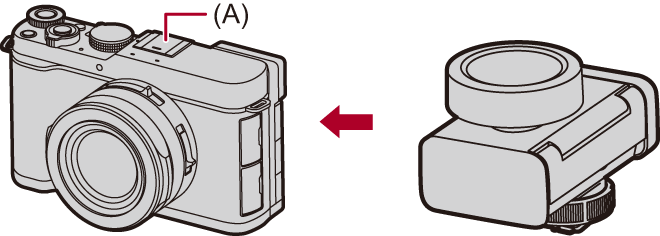
(A) Hot shoe
Getting started:
 Turn off the camera, and remove the hot shoe cover. (Removing the Hot Shoe Cover)
-
Attach the Digital Shotgun Microphone to the hot shoe, and then turn on the camera.
 Set to [
 ] mode. (Photo/Video/S&Q Switch)

 [
[ ] [
] [ ] [Hot Shoe Audio Input]
When the Digital Shotgun Microphone is attached, [Hot Shoe Audio Input] automatically turns [ON].
[ON]
Records the audio of the Digital Shotgun Microphone.
[OFF]
Records audio using the built-in microphone of the camera.
-
Make settings for the sound quality of the audio to be recorded in [Sound Rec Quality].
|
– When [Hot Shoe Audio Input] is set to [ON], the following settings are fixed: [Sound Rec Level Limiter]: [OFF] [Wind Noise Canceller]: [OFF] – When [Hot Shoe Audio Input] is set to [ON], [Sound Rec Gain Level] and [Sound Rec Level Adj.] are not available.
|

 ] is displayed on the screen.
 ] lights on the screen, operation of the Digital Shotgun Microphone stops in order to protect the camera against a rise in temperature.
[4ch Audio Recording]
You can record 4-channel audio by using a Digital Shotgun Microphone (DMW-DMS1: optional).
-
Set to [
] mode.
-
Set [4ch Audio Recording].
[] [] [4ch Audio Recording]
CH1/CH2 record to suit the directionality set on the Digital Shotgun Microphone.
[DMS1 BACKUP1]
Records the audio of the Digital Shotgun Microphone to CH1/CH2/CH3/CH4.
CH3 records across the entire range of directions as a backup audio recording.
CH4 records across the entire range of directions as a backup audio recording, 20 dB quieter than CH3.
[DMS1 BACKUP2]
Records the audio of the Digital Shotgun Microphone to CH1/CH2/CH3/CH4.
CH3 records in the same direction as CH1, as a backup audio recording, 20 dB quieter than CH1.
CH4 records in the same direction as CH2, as a backup audio recording, 20 dB quieter than CH2.
[OFF]
Records the audio of the Digital Shotgun Microphone to CH1/CH2.
|
|
[DMS1 Button Backlight]
You can set the brightness when the directivity buttons on the Digital Shotgun Microphone light.
[] [] [Hot Shoe Audio Input] [SET] Select [DMS1 Button Backlight]
Settings: [H] / [M] / [L]