Panasonic

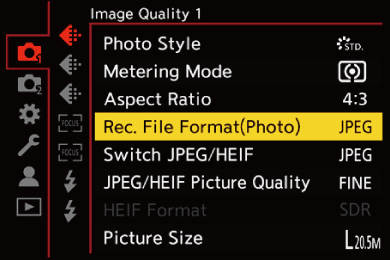
[Rec. File Format(Photo)]


icon_mode-photoicon_mode-movie_grayicon_mode-sq_gray

icon_mode-iaicon_mode-picon_mode-aicon_mode-sicon_mode-m

Sets the recording file format of pictures to be recorded.


  1. Set to [icon_mode-picture] mode.

(character_referencePhoto/Video/S&Q Switch)

  1. Set [Rec. File Format(Photo)].

character_bullet-largebutton_menu-set character_arrow [icon_picture] character_arrow [icon_photo-quality] character_arrow [Rec. File Format(Photo)]

gui_picture-fileformat_eng


[JPEG]

This records JPEG images.

bullet02This is available when [Switch JPEG/HEIF] is [JPEG]. (character_reference[Switch JPEG/HEIF])


[HEIF]

This records HEIF images.

bullet02This is available when [Switch JPEG/HEIF] is [HEIF]. (character_reference[Switch JPEG/HEIF])


[RAW+JPEG]

This records RAW and JPEG images simultaneously.

bullet02This is available when [Switch JPEG/HEIF] is [JPEG]. (character_reference[Switch JPEG/HEIF])


[RAW+HEIF]

This records RAW and HEIF images simultaneously.

bullet02This is available when [Switch JPEG/HEIF] is [HEIF]. (character_reference[Switch JPEG/HEIF])


[RAW]

This records RAW images.


icon_hints_s

Note on RAW

RAW format refers to a data format of images that have not been processed on the camera.

Playback and editing of RAW images require the camera or the dedicated software.

bullet02You can process RAW images on the camera. (character_reference[RAW Processing])

bullet02Use software (“SILKYPIX Developer Studio” by TECHNO HORIZON) to process and edit RAW files on a PC. (character_referenceSILKYPIX Developer Studio SE)

icon_info_s

bullet02Depending on the [Aspect Ratio], RAW images are recorded in the following sizes:

– [4:3]: 5208×3912

– [3:2]: 5416×3616

– [16:9]: 5672×3200

– [1:1]: 3912×3912

bullet02When you delete an image recorded with [RAW+JPEG]/[RAW+HEIF] on the camera, both the RAW and JPEG/HEIF images will be deleted simultaneously.

bullet02When the following function is being used, [Rec. File Format(Photo)] is not available:

– [Multiple Exposure]

icon_related-info_s

bullet02You can assign the function that records a RAW image and a JPEG/HEIF image simultaneously once only to an Fn button:

(character_reference[1 Shot RAW+JPEG]/[1 Shot RAW+HEIF])

bullet02Selects a Color Space setting from [sRGB] or [AdobeRGB]:

(character_reference[Color Space])