
ISO Sensitivity





You can set light sensitivity (ISO sensitivity).
-
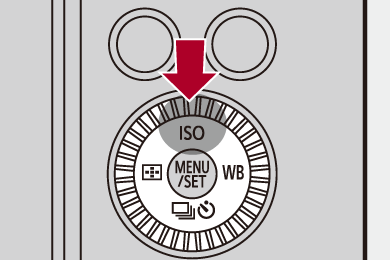
Press [ISO] (
 ).
).
-
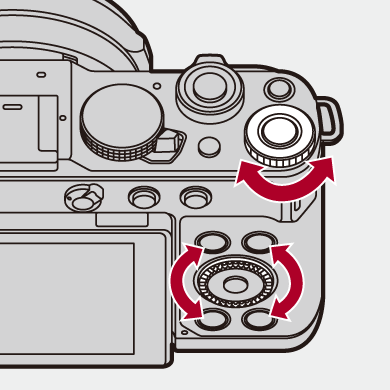
Select ISO sensitivity.
 Rotate
  or
or  .
.
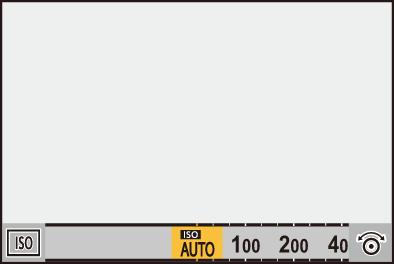
-
Confirm your selection.
Press the shutter button halfway.
|
Characteristics of the ISO Sensitivity By increasing the ISO sensitivity, the shutter speed can be increased in dark places to prevent camera shake and subject blur. However, higher ISO sensitivities also increase the amount of noise in the recorded images. |

 Setting Items (ISO Sensitivity)
[AUTO]
The ISO sensitivity is automatically adjusted according to the brightness.
 Taking picture: Maximum [3200]
 1
1
Video recording:
Maximum [6400]2 (Sensor output 60 fps or lower)
Maximum [3200]3 (Sensor output 61 fps or higher)
In [ ] mode:
[100]4 to [25600]
In [ ]/[S&Q] mode:
[100]4 to [12800] (Sensor output 60 fps or lower)
[100]4 to [3200]5 (Sensor output 61 fps or higher)
The ISO sensitivity is fixed at the selected value.
-
Default setting. The upper limit can be changed with [ISO Sensitivity (photo)].
-
Default setting. The upper limit can be changed with [ISO Sensitivity (video)].
-
Default setting. When [Extended ISO] is set to [ON], the upper limit can be set to [6400] with [ISO Sensitivity (video)].
-
By setting [Extended ISO] (
 [Extended ISO]) to [ON] in the [Custom] ([Image Quality]) menu, the ISO sensitivity can be extended to a lower limit of [50].
-
By setting [Extended ISO] (
[Extended ISO]) to [ON] in the [Custom] ([Image Quality]) menu, the ISO sensitivity can be extended to a upper limit of [12800].
When the following functions are being used, the ISO sensitivity that can be set is restricted.
– [Filter Settings]: Up to an upper limit of [3200]
– [Multiple Exposure]: Down to a lower limit of [100], up to an upper limit of [3200]
– [Like709] ([Photo Style]): Down to a lower limit of [100]
– [V-Log] ([Photo Style]):
Picture: Down to a lower limit of [500], up to an upper limit of [12800]
(The lower limit changes to [125] when [Extended ISO] is set.)
Video: Down to a lower limit of [500] (Sensor output 60 fps or lower)/[250] (Sensor output 61 fps or higher)
(The lower limit changes to [125] when [Extended ISO] is set.)
– [Standard(HLG)]/[Monochrome(HLG)]/[Hybrid Log Gamma] ([Photo Style]):
Picture: Down to a lower limit of [250], up to an upper limit of [12800]
Video: Down to a lower limit of [250]
– [Live View Composite]: Up to an upper limit of [1600]
When [Photo Style] is set to [REAL TIME LUT], the range of ISO sensitivity levels you can use depends on the base Photo Style of the applied LUT file.
|
(
ISO auto switches between [ON] and [OFF] each time you press the assigned button in the recording screen. (ISO sensitivity reverts to the previous setting when [OFF] is set.) |

[ISO Sensitivity (photo)]


Sets the lower and upper limits for ISO sensitivity when ISO sensitivity is set to [AUTO].
-
Set to [
] mode.
-
Set [ISO Sensitivity (photo)].

 [
[ ] [
] [ ] [ISO Sensitivity (photo)]
[ISO Auto Lower Limit Setting]
Sets the lower limit for ISO sensitivity when ISO sensitivity is [AUTO].
Set in the range between [100] and [12800].
[ISO Auto Upper Limit Setting]
Sets the upper limit for ISO sensitivity when ISO sensitivity is [AUTO].
Set in the range between [200] and [25600].
|
– [Live View Composite] |
