
HLG Recording (HEIF Format)





Record HEIF images with the wide dynamic range of the HLG format.
You can record in very bright light where overexposure can occur or in dark areas where underexposure can occur, maintaining the rich yet subtle colors you can see with your naked eye.
Recorded HEIF images can be played back on devices that support HLG format for viewing.
 HLG (Hybrid Log Gamma) is a tone curve (gamma curve) format for HDR images.
This is available when [Rec. File Format(Photo)] is [HEIF] or [RAW+HEIF]. ( [Rec. File Format(Photo)])
This is available when [Switch JPEG/HEIF] is [HEIF]. ([Switch JPEG/HEIF])
HLG format HEIF images
Compression format: HEVC
Color sampling: 4:2:0
Bit value: 10 bit
-
Set to [
 ] mode.
-
Set [HEIF Format] to [HDR(HLG)].


 [
[ ] [
] [ ] [HEIF Format]
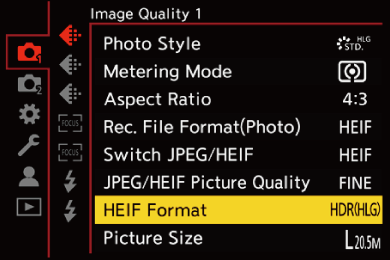
[HDR(HLG)]
Images with a wide dynamic range are recorded with the Hybrid Log Gamma mode.
[SDR]
Records with SDR format.
|
|
