
Selecting the Focus Mode





Select the focusing method (focus mode) to match subject movement.
It is also possible to customize the AF tracking features with [AFC]. ( [AF Custom Setting(Photo)])
-
Set the focus selector switch to the desired position.
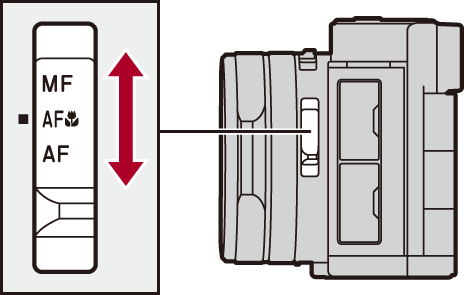
-
(When either [AF] or [AF
 ]) Set to AFS/AFC.
 [Photo]:
 [
[ ] [
] [ ] [AFS/AFC(Photo)]
[Video]: [ ] [] [AFS/AFC(Video)]
[AFS]
In [ ] mode:
 When the shutter button is not being pressed, the camera does not focus.
When the shutter button is pressed halfway, the camera focuses only once.
In [ ]/[S&Q] mode:
When the shutter button is not being pressed, the camera does not focus.
When the shutter button is pressed halfway, the camera focuses only once.
[AFC]
In [] mode:
When the shutter button is not being pressed, the camera does not focus.
When the shutter button is pressed halfway, the focus is constantly adjusted according to the movement of the subject.
In []/[S&Q] mode:
When the shutter button is not being pressed, the camera does not focus.
When the shutter button is pressed halfway, the camera focuses only once.
During video recording, the focus is constantly adjusted according to the movement of the subject.
[MF]
Manual focusing. Use this when you want to fix the focus or avoid activating AF. (Record Using MF)
|
– In low light situations |
