
Using AF





AF (Auto Focus) refers to automatic focusing.
Select the focus mode and the AF mode appropriate for the subject and scene.
-
Set the focus mode to [AFS] or [AFC].
-
Select the AF mode.
 Press [
 ] (
] ( ) to display the AF mode selection screen, and set using
  . (
. ( Selecting the AF Mode)
 In [iA] mode, each press of [] switches between [
 ] and [
 ]. (AF Mode)
-
Press the shutter button halfway.
The AF operates.
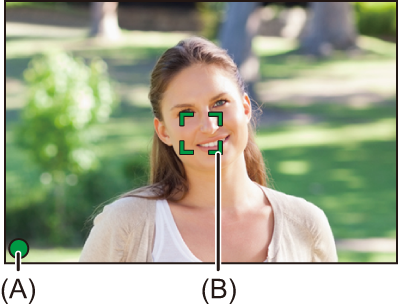
|
|
Focus |
|
|
|
In focus |
Not in focus |
|
Focus icon (A) |
Lights |
Blinking |
|
AF area (B) |
Green |
Red |
|
AF beep |
Two beeps |
— |
Low illumination AF
In dark environments, low illumination AF automatically operates, and the focus icon is indicated as [ ].
].
Achieving focus may take more time than usual.
Starlight AF
If the camera detects stars in the night sky after determining low illumination AF, then Starlight AF will be activated.
When focus is achieved, the focus icon will display [ ], and the AF area will be displayed on the area in focus.
Edges of the screen cannot detect Starlight AF.
 [AF ON] button
You can also activate AF by pressing [AF ON].
|
– Fast-moving subjects – Extremely bright subjects – Subjects without contrast – Subjects recorded through windows – Subjects near shiny objects – Subjects in very dark locations – When recording subjects both distant and near
– When zooming from the wide-angle end to the telephoto end – When the subject is suddenly changed from one far away to one close by
For information about the high temperature display ( |
|
(
This function is useful when the camera mistakenly focuses on the background:
This function is useful when taking pictures through fences or nets: |


[AF-Point Scope]


This magnifies the focus point when the AF mode is [ ], [
], [ ], or [
 ]. (In other AF modes, the center of the screen is magnified.)
You can check focus and observe an enlarged subject as with a telephoto lens.
-
Register [AF-Point Scope] to the Fn button. (
Fn Buttons)
-
Enlarge display.
Press the Fn button set in Step 1.
While pressing the button, the focus point is enlarged.
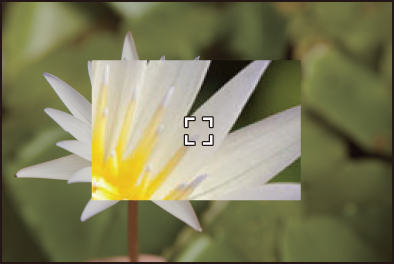
When the screen is enlarged, pressing the shutter button halfway re-acquires focus in a small central AF area.
When the screen is enlarged, turn  to adjust the magnification.
|
– Video recording/SH burst recording
|
[AF Custom Setting(Photo)]

You can select features of AF operation when taking pictures with [AFC] that are appropriate for the subject and scene.
Each of these features can be further customized.
-
Set to [
 ] mode.
-
Set the focus mode to [AFC].
-
Set [AF Custom Setting(Photo)].
 [
[ ] [
] [ ] [AF Custom Setting(Photo)]
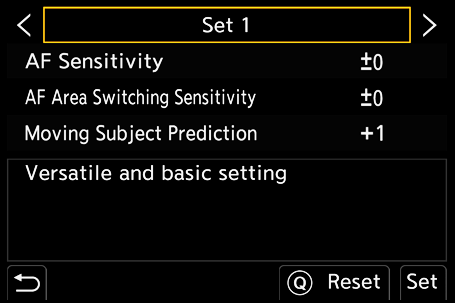
[Set 1]
Basic general-purpose setting.
[Set 2]
Suggested for situations where the subject moves at a constant speed in one direction.
[Set 3]
Suggested when the subject moves randomly, and other objects may be in the scene.
[Set 4]
Suggested for situations where the speed of the subject changes significantly.
Adjusting AF Custom Settings
-
Press
 to select the AF Custom setting type.
-
Press

 to select items and press to adjust.
A description of the item is displayed on the screen when you press [DISP.].
To reset settings to the default, press [Q].
-
Press
.
|
[AF Sensitivity] |
Sets the tracking sensitivity for the movement of subjects. |
|
|
[+] |
When the distance to the subject changes drastically, the camera re-adjusts the focus immediately. You can bring different subjects into focus one after another. |
|
|
[−] |
When the distance to the subject changes drastically, the camera waits for a short period of time before re-adjusting the focus. This allows you to prevent the focus from being accidentally re-adjusted when, for example, an object moves across the image. |
|
|
[AF Area Switching Sensitivity] |
Sets the sensitivity for switching the AF area to match subject movement. (When AF mode is set to Full Area AF) |
|
|
[+] |
When the subject moves out of the AF area, the camera immediately switches the AF area to keep the subject in focus. |
|
|
[−] |
The camera switches the AF area at a gradual pace. Effects caused by a slight movement of the subject or by obstacles in front of the camera will be minimized. |
|
|
[Moving Subject Prediction] |
Sets the tracking method for changes in the speed of subject movement.
|
|
|
[0] |
This is suited to a subject with minimal changes in speed. |
|
|
[+1] |
These are suited to a subject that changes its speed. |
|
|
[+2] |
||
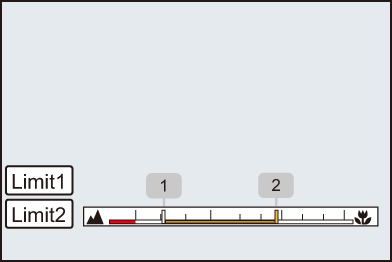
[Focus Limiter]
You can restrict the range for AF to work.
The focusing speed of AF increases when you limit the range where AF works.
-
Set the focus mode to [AFS] or [AFC].
-
Set [Focus Limiter].
[]/[ ] [] [Focus Limiter]
[ON]
Enables the following settings.
[OFF]
Disables the following settings.
[SET]
-
Use the same procedure as MF (
Record Using MF) to check the focus, then touch [Limit1] or [Limit2] to set the range of operation for AF.
[Limit1]/[Limit2] can be set from either.
-
Press
to confirm the setting.
Press [DISP.] to return the operation range to the default setting.
|
– [AF+MF]
|
 ]/[
]/[ ] is displayed on the screen.
 ] lights on the screen, the enlarged screen is not displayed in order to protect the camera against a rise in temperature.
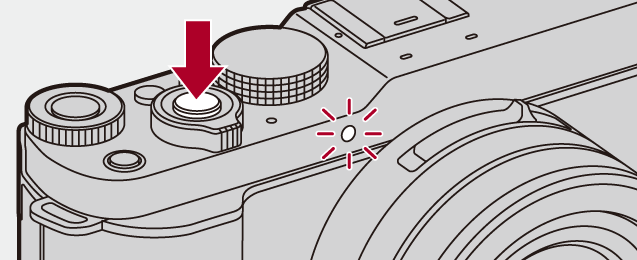
[AF Assist Light]
When recording in low light conditions, the AF assist light turns on when you press the shutter button halfway, making it easier for the camera to focus.
[]/[] [] Select [AF Assist Light]
Settings: [ON]/[OFF]
|
|
[Focus Frame Moving Speed]
Sets the speed when moving the AF area/MF Assist.
[]/[] [] Select [Focus Frame Moving Speed]
Settings: [FAST]/[NORMAL]
[Focus Frame Color Setting]
Sets the color of the focus frame.
[]/[] [] Select [Focus Frame Color Setting]
Select the color to set.