
Taking Burst Pictures





Takes pictures continuously while the shutter button is pressed and held.
You can select burst recording settings to suit the recording conditions, including [H], [M], and [L] which enable burst recording with high image quality, and SH burst recording which takes burst pictures at ultra high speeds using an electronic shutter.
-
Set to [
 ] mode.
-
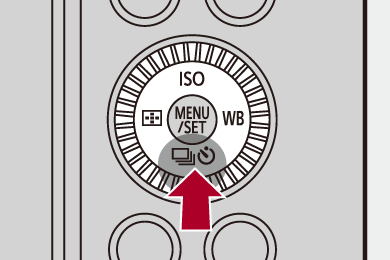
Press [
 ] (
] ( ).
).
-
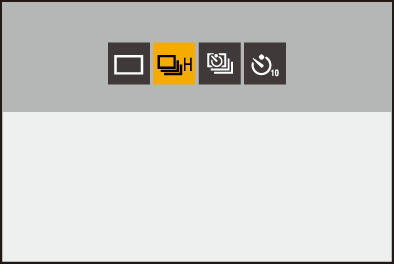
Press

 to select [Burst] and press
  .
.
 You can also select by rotating
  .
.
-
Select the burst rate.
Press to select an item and then press  .
.
You can also select by rotating  or .
or .
This can also be set in [Burst Shot Setting] in the [Photo] menu.
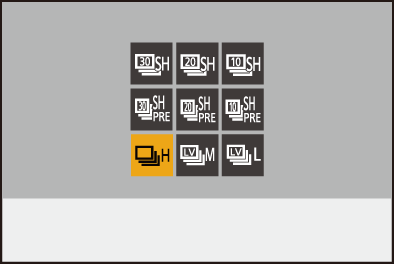
[SH30]
Takes burst pictures at ultra high speed with the electronic shutter, 30 frames/second.
[SH20]
Takes burst pictures at ultra high speed with the electronic shutter, 20 frames/second.
[SH10]
Takes burst pictures at high speed with the electronic shutter, 10 frames/second.
[SH30 PRE]
Takes pre-burst pictures at ultra high speed, 30 frames/second. ( SH Pre-burst Recording)
[SH20 PRE]
Takes pre-burst pictures at ultra high speed, 20 frames/second. (SH Pre-burst Recording)
[SH10 PRE]
Takes pre-burst pictures at high speed, 10 frames/second. (SH Pre-burst Recording)
[H]
Takes high-speed burst pictures.
[M]
Takes medium-speed burst pictures.
[L]
Takes low-speed burst pictures.
-
Close the menu.
Press the shutter button halfway.
-
Start recording.
 Takes burst pictures while the shutter button is pressed fully.
 SH Pre-burst Recording
The camera records pictures while the shutter button is pressed halfway before recording starts and for the 0.5 seconds just prior to the shutter button being pressed fully.
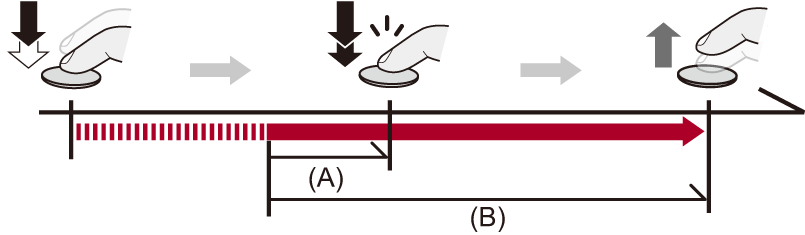
(A) 0.5 seconds
(B) Recorded range
[PRE] is displayed on the recording screen during SH pre-burst recording.
If the shutter button is pressed and held at halfway for approx. 1 minute, the frames before pressing fully cannot be saved. Press the shutter button halfway again.
Burst Rate
The burst rate may be lower depending on the settings for recording such as [Picture Size] and focus mode.
Maximum Number of Frames Recordable
|
|
[Rec. File Format(Photo)] |
||||
|
|
[JPEG] |
[RAW+JPEG] |
[RAW] |
[HEIF] |
[RAW+HEIF] |
|
[SH30]/ [SH30 PRE] |
45 frames |
35 frames |
|||
|
[SH20]/ [SH20 PRE] |
|||||
|
[SH10]/ [SH10 PRE] |
|||||
|
[H] (High speed) |
100 frames or more |
40 frames or more |
55 frames or more |
35 frames or more |
25 frames or more |
|
[M] (Medium speed) |
|||||
|
[L] (Low speed) |
|||||

When recording under the test conditions specified by Panasonic.
Recording conditions may reduce the maximum number of frames recordable.
-
Recording stops when the maximum number of frames recordable is reached.
For SH pre-burst recording, this includes the number of pictures taken with pre-burst recording.
-
The burst rate will become lower during recording but pictures can continue to be taken until the card becomes full.
-
Using a Nextorage SDXC memory card compliant with UHS-II UHS Speed Class 3
The Number of Frames That Can Be Saved in Pre-Burst Recording Before and After Fully Pressing the Shutter Button
|
Burst Rate |
[Rec. File Format(Photo)] |
Before pressing fully |
After pressing fully |
|
[SH30 PRE] |
[JPEG] [RAW+JPEG] [RAW] |
15 frames |
30 frames |
|
[HEIF] [RAW+HEIF] |
15 frames |
20 frames |
|
|
[SH20 PRE] |
[JPEG] [RAW+JPEG] [RAW] |
10 frames |
35 frames |
|
[HEIF] [RAW+HEIF] |
10 frames |
25 frames |
|
|
[SH10 PRE] |
[JPEG] [RAW+JPEG] [RAW] |
5 frames |
40 frames |
|
[HEIF] [RAW+HEIF] |
5 frames |
30 frames |
Number of Pictures That Can Be Taken Continuously
When you press the shutter button halfway, the number of pictures that can be taken continuously will appear on the recording screen.
Example) When 20 frames: [r20]
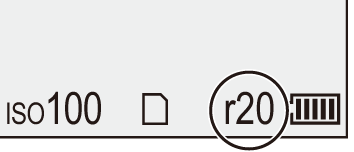
Once recording starts, the number of pictures that can be taken continuously will decrease.
– During [H]/[M]/[L] burst recording: When [r0] appears, the burst rate decreases.
– During SH burst recording: When [r0] appears, the burst recording stops.
Also, the [r] indication continues to be displayed after recording until the number of pictures that can be taken continuously returns to the maximum.
Focus when Taking Burst Pictures
|
Focus mode |
[Focus/Shutter Priority] ( |
[SH30]/[SH30 PRE]/[SH20]/[SH20 PRE]/[SH10]/[SH10 PRE] |
[H] |
[M]/[L] |
|
[AFS] |
[FOCUS] |
Fixed to the focus of the first frame |
||
|
[BALANCE] |
||||
|
[RELEASE] |
||||
|
[AFC] |
[FOCUS] |
Estimated focus |
Normal focus |
|
|
[BALANCE] |
Estimated focus |
|||
|
[RELEASE] |
||||
|
[MF] |
— |
Focus set with manual focus |
||
When the subject is dark with [AFC], the focus is fixed to that of the first frame.
With estimated focus, the burst rate takes priority and the focus is estimated to the extent possible.
With normal focus, the burst rate may become slow.
Exposure when Taking Burst Pictures
|
If you continue to take burst pictures while saving is in progress, the maximum number of frames recordable will be reduced. When taking burst pictures, we recommend using a high-speed card.
– [Live View Composite] – [Multiple Exposure] Notes on SH burst recording
– [SH30]/[SH30 PRE]: To a minimum of 1/60 – [SH20]/[SH20 PRE]: To a minimum of 1/60 – [SH10]/[SH10 PRE]: To a minimum of 1/60
For information about the high temperature display ( |
|
Notes on SH pre-burst recording
– When recording with the Touch Shutter – When [Half-Press Shutter] in the [Custom] ([Focus/Shutter]) menu is set to [ON]
|

 ] (Burst Shot) indication on the recording screen turns yellow when operation is limited.