
[Wi-Fi] Menu
 Fn Button Assigned with [Wi-Fi]
This configures the settings required for the Wi-Fi function.
The settings cannot be changed while connected with Wi-Fi.
Displaying the [Wi-Fi] menu.

 [
[ ] [
] [ ] [Wi-Fi]
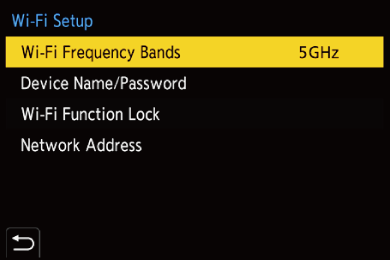
[Wi-Fi Frequency Bands]
This sets the frequency band used for direct connection with a smartphone.
[2.4GHz]: Connection uses the 2.4 GHz frequency band.
[5GHz]: Connection uses the 5 GHz frequency band.
 Depending on the region, local regulations, etc. may prohibit you from using the 5 GHz frequency band outdoors. If this is the case, when outdoors, connect to the smartphone using [2.4GHz] for the Wi-Fi connection.
[Device Name/Password]
You can change the camera name (SSID) and password.
Press [DISP.] to change the device name and password.
The number of characters you can enter is a maximum of 32 for the device name and between 8 and 63 for the password.
[Wi-Fi Function Lock]
You can set a password to prevent incorrect operation and use of the Wi-Fi functions by a third party and to protect personal information that may be found either in the camera itself or in images recorded with the camera.
[Setup]: Enter any 4-digit numbers as the password.
Once a password is set, you are required to enter it when you select [Wi-Fi].
[Cancel]: Cancel the password.
[Network Address]
Displays the MAC address and IP address of the camera when connecting via Wi-Fi.
|
|


Fn Button Assigned with [Wi-Fi]
You can perform the following operations by pressing the Fn button assigned with [Wi-Fi] after connecting to Wi-Fi. ( Fn Buttons)
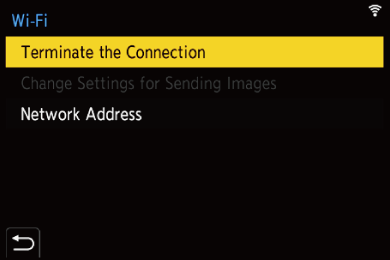
[Terminate the Connection]
Terminates the Wi-Fi connection.
[Change Settings for Sending Images]
Sets the image size, file format, and other items for sending recorded images. (Image Send Settings)
[Network Address]
Displays the MAC address and IP address of the camera. ([Network Address])
Depending on the Wi-Fi function being used or the connection destination, you may not be able to perform some of these operations.