
Manual Exposure Mode
 Available Shutter Speeds (Sec.)





In [M] mode (Manual Exposure mode), you can record by manually setting the aperture value and shutter speed.
In default settings, the ISO sensitivity is set to [AUTO].
As a result, the ISO sensitivity will be adjusted according to the aperture value and shutter speed.
Exposure compensation can also be used when ISO sensitivity is set to [AUTO].
-
Set the recording mode to [M].
Set the mode dial. ( Selecting the Recording Mode)
-
Set the aperture value and shutter speed.
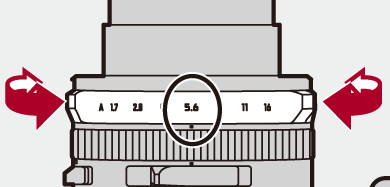
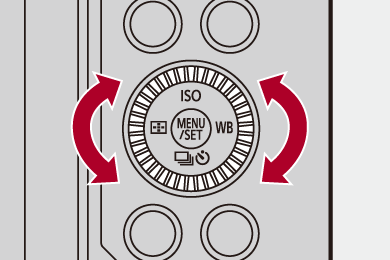
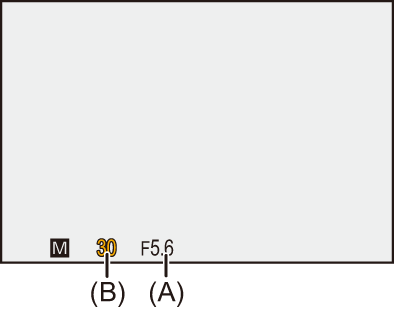
Turn the aperture ring to set the aperture value (A), and  to set the shutter speed (B).
 You can set the aperture value with
  if you set the aperture ring to the [A] position.
-
Start recording.
If the correct exposure is not achieved when the shutter button is pressed halfway, the aperture value and the shutter speed blink red.
 Manual Exposure Assist
When ISO sensitivity is set to other than [AUTO], Manual Exposure Assist (example:  ) will be displayed on the recording screen.
You can check the difference between the current exposure value and the standard exposure (±0) measured by the camera.
Use Manual Exposure Assist as a guide.
We recommend checking the images on the playback screen when recording.
Available Shutter Speeds (Sec.)
[MECH.]
[T] (Time, max. approx. 60 seconds), 60 to 1/2000
[ELEC.]
[T] (Time, max. approx. 60 seconds), 60 to 1/32000
[ELEC.+NR]
[T] (Time, max. approx. 60 seconds), 60 to 1/32000
|
To check the effects on the recording screen, use [Preview]. ( You can set the preview of the aperture effect and the shutter speed effect to constantly operate in [M] mode to check the depth of field and movement of the subject while recording:
Check the images on the playback screen.
|


[T] (Time)
If you set the shutter speed to [T] (Time) and press the shutter button fully, the shutter stays open. (max. approx. 60 seconds )
)
The shutter closes when you press the shutter button again.
Use this when you want to keep the shutter open for a long time to record images of fireworks, night scenery or a starry sky.
-
When the shutter type is [ELEC.] or when [Long Exposure NR] is [OFF], shutter speed will be faster than 60 seconds to suit the ISO sensitivity.
It will be about 30 seconds when the ISO sensitivity is 200 and about 15 seconds when it is 400.
|
If you are concerned about noise, we recommend that you set [Long Exposure NR] (
– SH burst recording – [Time Lapse Shot] – [Stop Motion Animation] (when set to [Auto Shooting]) – [Bracketing] – [Live View Composite] |
