 Table of contents


The following functions may not work depending on the content.
Press [ PAUSE] again or [
 PLAY] to restart play.
While playing, press [SEARCH ] or [SEARCH
 ].
].
The speed increases up to 5 steps.
MP3, etc.: The speed is fixed to a single step.
Press [PLAY] to revert to normal playback speed.
While playing or paused, press [ ] or [
 ].
].
You can change the audio channel number, etc.
Select the item and press [OK].
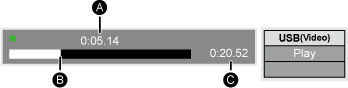
While playing, press [STATUS].
The status messages give you information about what is currently being played. Each time you press [STATUS], the display information may change or will disappear from the screen.
Depending on contents, the display may change or may not appear.

 STOP].

