
Dual Codec Recording Functions Added [X2100]
Dual codec recording functions are now available.
 Folder name of the MOV format/MP4 format video data (Dual codec recording)
Display of the clips in the thumbnail screen
Screen display during shooting
Recording function that cannot be used simultaneously
Dual codec recording
You can make main and sub recordings simultaneously in separate [REC FORMAT] settings.
Sub recording records scenes in a picture quality lower than that of the [REC FORMAT] setting for main recording.
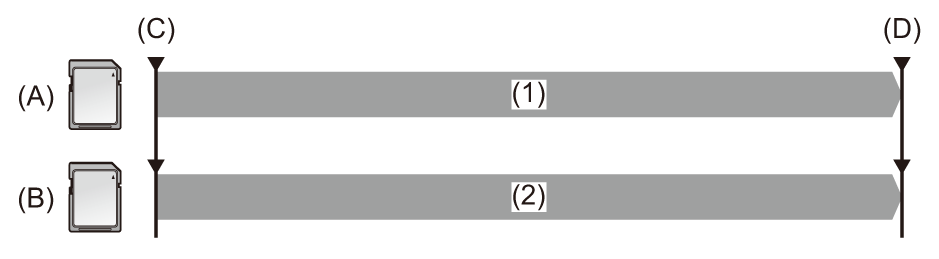
(A) Card slot 1 (main recording)
(B) Card slot 2 (sub recording)
(C) Start recording
(D) Pause
-
Recording
-
Recording in low picture quality
-
Select [SYSTEM] menu
 [FILE FORMAT] [MOV] or [MP4].
-
Set [REC FORMAT] and [DUAL CODEC SETTING].
[SYSTEM] menu [REC FORMAT]
[RECORDING] menu [DUAL CODEC SETTING]
[FHD 50Mbps]
Performs recording at a bit rate of 50 Mbps.
[FHD 8Mbps]
Performs recording at a bit rate of 8 Mbps.
 For details about the setting items (
 Note regarding [REC FORMAT] and [DUAL CODEC SETTING] which can be set with dual codec recording)
The settings for clips recorded on the sub recording side will be as follows:
– Recording will be performed in the same file format as the main recording side.
– Recording is at FHD (1920×1080).
– The recorded frame rate will be the same as the recording format on the main recording side.
-
Select [RECORDING] menu
[2 SLOTS FUNC.] [DUAL CODEC REC].
Either [DUAL 50M] or [DUAL 8M] is displayed in the 2-slot function display on the camera image screen.
When dual codec recording is not possible, such as when a memory card has not been inserted in card slot 2, the display for [DUAL 50M]/[DUAL 8M] will appear crossed out.
-
Press the REC button.
|
– There is no recordable memory card in card slot 2 – There is no remaining space on the memory card in card slot 2
Recording stops if there is an error with the memory card on the main recording side.
– When [FILE FORMAT] or [REC FORMAT] is set to an item that does not support dual codec recording – When [NETWORK] menu
– [REC CHECK] – [DEL LAST CLIP]
|
 Note regarding [REC FORMAT] and [DUAL CODEC SETTING] which can be set with dual codec recording
When [DUAL CODEC SETTING] is set to [FHD 50Mbps]
When [DUAL CODEC SETTING] is set to [FHD 8Mbps]
|
– [RECORDING] menu – [NETWORK] menu – [SYSTEM] menu – [SYSTEM] menu |
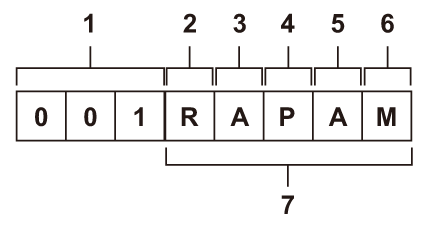
Folder name of the MOV format/MP4 format video data (Dual codec recording)
The fourth through eighth characters of the folder name differ depending on the setting of the unit.
-
Recording setting
M: Standard recording, simultaneous recording (card slot 1), dual codec recording (main recording)
S: Dual codec recording (sub recording)
T: Simultaneous recording (card slot 2)
|
|
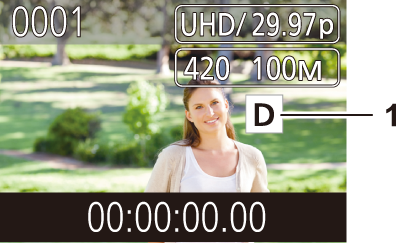
Display of the clips in the thumbnail screen
-
Dual codec recording
Displayed on clips (main recording/sub recording) that used dual codec recording.
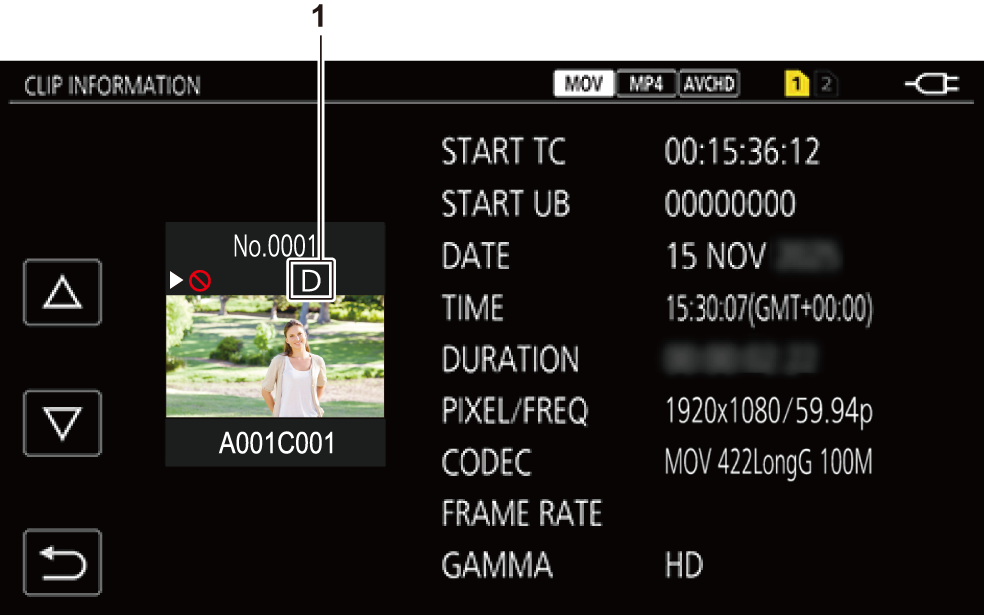
Display of clip information
-
Dual codec recording
Displayed on clips (main recording/sub recording) that used dual codec recording.
Screen display during shooting
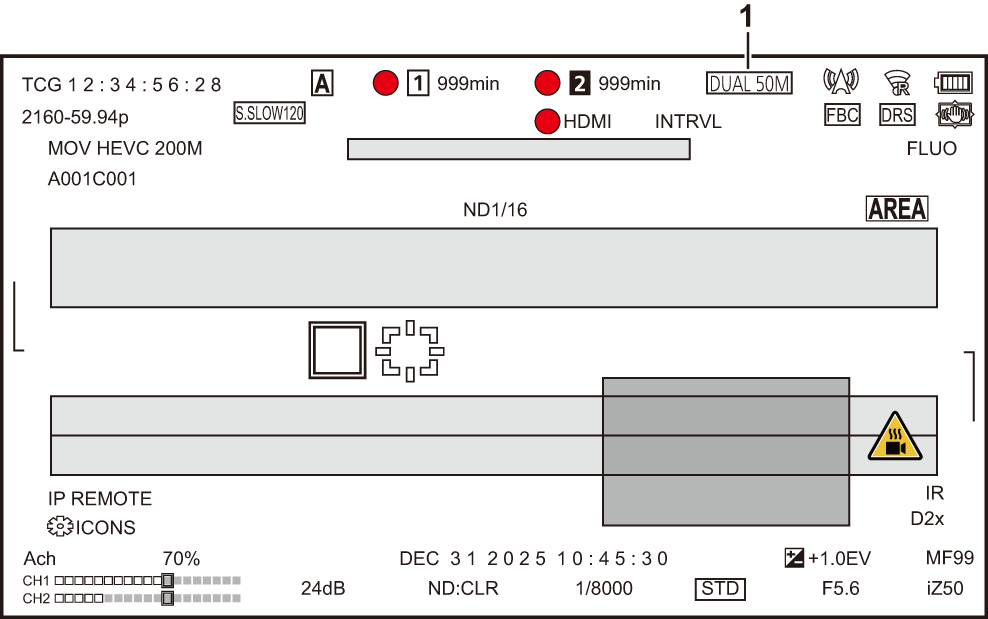
-
2-slot function (Dual codec recording)
[DUAL 50M]:
When dual codec recording is enabled and [DUAL CODEC SETTING] is [FHD 50Mbps]
[DUAL 8M]:
When dual codec recording is enabled and [DUAL CODEC SETTING] is [FHD 8Mbps]
Warning system
When an error is detected right after the unit is turned on or during the operation, the occurrence of the error is notified in the camera image screen of the LCD monitor or by the tally lamps. Deal with the error by following the indications.
Cases indicated by error messages
Alert
|
Screen display |
Description |
Behavior and cause |
|
Camera image screen |
||
|
[DUAL CODEC REC WARNING <SLOT 2>] |
An error occurred with the memory card on the sub recording side during dual codec recording. |
|
|
[DUAL CODEC REC WARNING <SLOT 2>] [<OVER MAX NUM. OF CLIPS>] |
During dual codec recording, you are trying to record when the number of clips for the memory card on the sub recording side exceeds the upper limit. |
|
Recording function that cannot be used simultaneously
Depending on the recording function that is set, there are recording functions that cannot be used simultaneously.
Meaning of the symbols used in the table are as follows.
 : Can be used simultaneously.
—: Cannot be used simultaneously.
|
Recording function to additionally set |
Recording function that is set |
|||
|
Pre-recording |
Relay recording |
Simultaneous recording |
Background recording |
|
|
Pre-recording |
|
|
|
— |
|
Relay recording |
|
|
— |
— |
|
Simultaneous recording |
|
— |
|
— |
|
Background recording |
— |
— |
— |
|
|
Dual codec recording |
|
— |
— |
— |
|
Interval recording |
— |
— |
|
— |
|
Super slow recording |
— |
— |
— |
— |
|
Recording function to additionally set |
Recording function that is set |
||
|
Dual codec recording |
Interval recording |
Super slow recording |
|
|
Pre-recording |
|
— |
— |
|
Relay recording |
— |
— |
— |
|
Simultaneous recording |
— |
|
— |
|
Background recording |
— |
— |
— |
|
Dual codec recording |
|
— |
— |
|
Interval recording |
— |
|
— |
|
Super slow recording |
— |
— |
|