
Shooting
For shooting, use the following steps.
 (For the
  /
/ )
)
To use the REC button (on the handle) and tally lamp, attach the handle unit ( supplied, optional) to the unit.
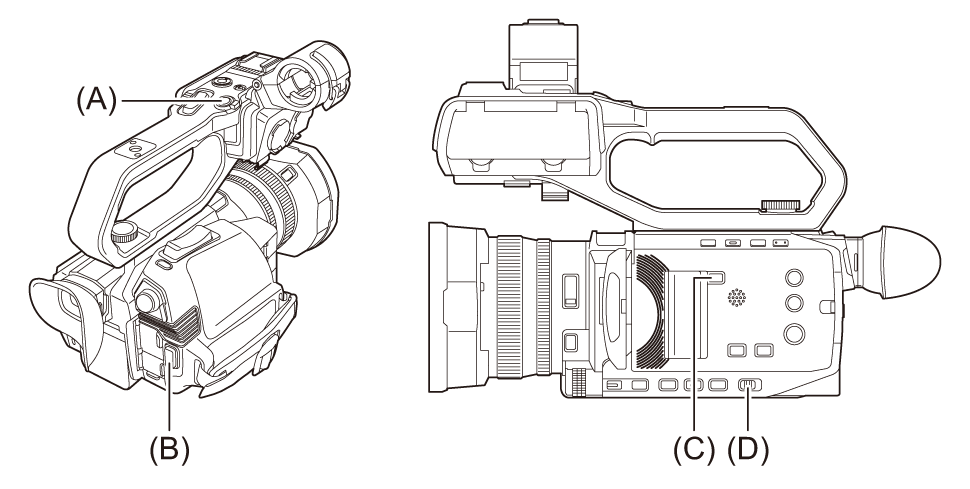
(A) REC button (on the handle)
(B) REC button (on the grip)
(C) <SLOT SEL> button
(D) <AUTO/MANU> switch
-
Make settings before recording.
Before shooting, the followings must be set or adjusted.
– Image settings for the brightness function (iris, gain, shutter) and the white balance adjustment function, etc.
– Audio input settings for audio recording.
– Adjusting audio recording level
Press the <SLOT SEL> button to select the memory card to record to.
-
Select shooting mode with the <AUTO/MANU> switch.
-
Start the recording by pressing the REC button.
One REC button is located on both the handle and the grip.
The tally lamp is illuminated in red while recording. ( Tally lamp [X2100]/[X1600])
-
Press the REC button again to stop.
 About the screen displays during recording
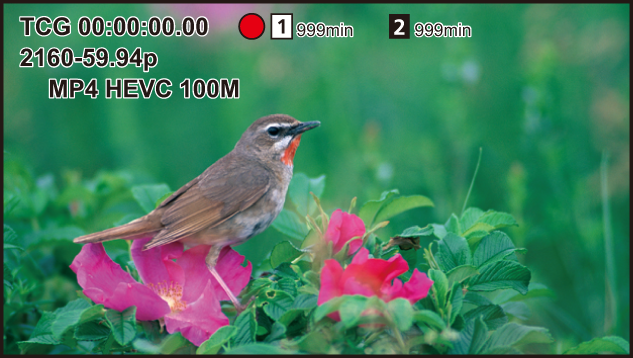
[TCG 00:00:00.00]:
Time data (Setting of time data)
[ ]/[
]/[ ]:
]:
Card slot number (recording target)
 is displayed on the left during recording.
[ ]/[
]/[ ]:
]:
Card slot number
[999min]:
Remaining recording capacity in the memory card
The display flashes when the remaining recording capacity falls below 2 minutes.
[2160-59.94p]:
Resolution, frame rate (Selecting the resolution, codec, and frame rate for recording video)
[MP4 HEVC 100M]:
File format, recording format (Selecting the resolution, codec, and frame rate for recording video)