
Adjusting and setting the viewfinder [X2100]/[X1600]
This unit is equipped with a 0.39-inch organic EL display viewfinder. Use either the viewfinder or the LCD monitor depending on your purpose and the shooting conditions.

Using the viewfinder
When the LCD monitor is difficult to use because the surroundings are bright, you can check the image using the viewfinder.
-
Extend the viewfinder.
The viewfinder turns on when it is extended and turns off when retracted.
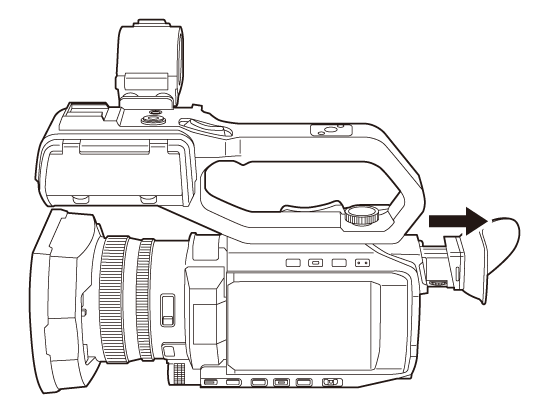
-
Move the viewfinder in the vertical direction to adjust the screen to a comfortable angle.
The viewfinder can be elevated approximately 50°.
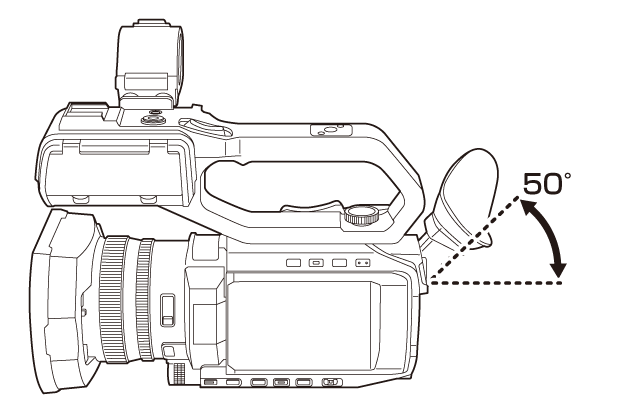
-
Adjust the characters on the viewfinder screen so that they are clearly visible using the diopter adjustment dial.
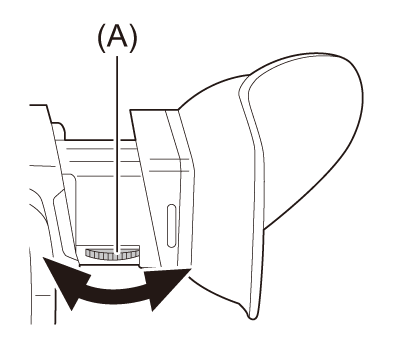
(A) Diopter adjustment dial
|
Set to the following setting when the [VIDEO OUT/LCD/VF] menu – [VIDEO OUT/LCD/VF] menu
|
 (For the
  )
)Adjusting the viewfinder
 Adjusting brightness, contrast, color level, redness, and blueness
By setting the following items in the [VIDEO OUT/LCD/VF] menu  [VF], you can adjust items such as brightness and contrast for the viewfinder:
[BRIGHTNESS]:
Adjusts the brightness.
[COLOR LEVEL]:
Adjusts the density of the colors.
[CONTRAST]:
Adjusts the contrast.
[RED TINT]:
Adjusts the strength of red.
[BLUE TINT]:
Adjusts the strength of blue.
The adjustments for the viewfinder do not affect the images output or recorded by the camera.
Switching between color and monochrome
The viewfinder screen can switch between a color display and monochrome display. Set the display with the [VIDEO OUT/LCD/VF] menu [VF] [VF COLOR].