
[STREAMING PROTOCOL] Setting Items Added [CX20]
SRT client and SRT listener have been added as streaming protocols available for use by streaming functions.
 Basic setting of the camera (SRT)
Management of setting information (SRT)
Entering the setting using the setting tool
Basic setting of the camera (SRT)
Also refer to the description for “Basic setting of the camera”.
Step 3: Setting for each protocol and starting the streaming
SRT client
-
Set the [SYSTEM] menu
 [FREQUENCY]/[REC FORMAT].
 For details about the setting items (
 [STREAMING FORMAT] (SRT))
-
Select the [NETWORK] menu
[STREAMING] [STREAMING PROTOCOL] [SRT CLIENT].
-
Set the destination. (
Setting of the destination)
You can also set a destination from an SD card for setting that has been created using the P2 Network Setting software. (Entering the setting using the setting tool)
-
Select the [NETWORK] menu
[STREAMING] [START] [ON].
If the camera is connected to the transmission destination through a network, the camera starts the transmission of streaming video.
To stop the transmission of the streaming image, select the [NETWORK] menu [STREAMING] [START] [OFF].
|
|
SRT listener
Start the streaming with an operation of the application software or device at the receiving side (referred to as “receiving side” hereinafter).
-
Set the [SYSTEM] menu
[FREQUENCY]/[REC FORMAT].
For details about the setting items ([STREAMING FORMAT] (SRT))
-
Select the [NETWORK] menu
[STREAMING] [STREAMING PROTOCOL] [SRT LISTENER].
-
On this unit, set the following items with [NETWORK] menu
[STREAMING] [SRT SETTING].
Set the standby port in [PORT].
Number 80 and the same value as the port number set for other menu item cannot be specified.
When the streamed data is to be encrypted, select the encryption protocol in [ENCRYPTION] and enter a passphrase in [PASSPHRASE].
-
Specify the IP address and the stream ID of this unit as shown below on the receiving side, then start streaming.
srt://(IP address):(Port number)
The stream ID is fixed to the following value in the SRT listener mode:
#!::m=publish,r=PanasonicStream
|
|
Management of setting information (SRT)
You can set, save and load the destination.
 Setting of the destination
Information regarding the destination can be set or referenced.
Also refer to the explanations in “Referencing destination from the memory card”, “Loading destination information from the memory card”, and “Clearing the destination information”.
Setting the destination with the camera menu
-
Select the [NETWORK] menu
[STREAMING] [CONNECTION INFO.] [MEMORY].
-
Set the following items with [NETWORK] menu
[STREAMING] [SRT SETTING].
Enter the destination URL in [DEST URL] using the following format:
srt://(server URL):(port number)/(path)
Enter the stream ID in [STREAM ID].
When the streamed data is to be encrypted, select the encryption protocol in [ENCRYPTION] and enter a passphrase in [PASSPHRASE].
|
|
Saving the destination information on the memory card
-
Insert a memory card formatted with the unit.
The card slot to perform loading and saving can be set in the [OTHERS] menu [FILE] [SLOT FOR LOAD/SAVE].
-
Select the [NETWORK] menu
[STREAMING] [SAVE (SD CARD)].
-
Select [YES].
|
|
[STREAMING FORMAT] (SRT)
The item that can be selected varies depending on the [STREAMING PROTOCOL] settings.
You can select the following streaming formats when you selected [SRT CLIENT] or [SRT LISTENER].
When the [SYSTEM] menu [FREQUENCY] [59.94Hz] is set
|
[SYSTEM] menu |
[NETWORK] menu |
|
|
[FILE FORMAT] |
[REC FORMAT] |
[STREAMING FORMAT] |
|
[P2] |
[1080-59.94p/AVC-G25] [1080-59.94p/AVC-G12] |
[1920×1080-60fps 24M] [1920×1080-60fps 20M] [1920×1080-60fps 16M] [1280×720-60fps 14M] [1280×720-60fps 8M] [1280×720-60fps 3M] |
|
[MOV] |
[1080-59.94p/422LongGOP 100M] [1080-59.94p/422ALL-I 200M] |
|
|
[MP4] |
[1080-59.94p/420LongGOP 50M] [1080-59.94p/420LongGOP 28M] |
|
|
[AVCHD] |
[1080-59.94p/AVCHD PS] |
|
|
[P2] |
[1080-59.94i/AVC-I100] [1080-59.94i/AVC-I50] [1080-59.94i/AVC-G50] [1080-59.94i/AVC-G25] [1080-59.94i/AVC-G12] |
[1920×1080-30fps 14M] [1920×1080-30fps 6M] [1920×1080-30fps 1M] [1280×720-30fps 8M] [1280×720-30fps 2M] [1280×720-30fps 1M] |
|
[MOV] |
[1080-59.94i/422LongGOP 50M] [1080-59.94i/422ALL-I 100M] [1080-29.97p/422LongGOP 50M] [1080-29.97p/422ALL-I 100M] |
|
|
[MP4] |
[1080-59.94i/420LongGOP 50M] [1080-29.97p/420LongGOP 20M] |
|
|
[AVCHD] |
[1080-59.94i/AVCHD PH] [1080-59.94i/AVCHD HA] |
|
|
[P2] |
[720-59.94p/AVC-I100] [720-59.94p/AVC-I50] [720-59.94p/AVC-G50] [720-59.94p/AVC-G25] [720-59.94p/AVC-G12] |
[1280×720-60fps 14M] [1280×720-60fps 8M] [1280×720-60fps 3M] |
|
[AVCHD] |
[720-59.94p/AVCHD PM] |
|

When the [SYSTEM] menu [FREQUENCY] [50.00Hz] is set
|
[SYSTEM] menu |
[NETWORK] menu |
|
|
[FILE FORMAT] |
[REC FORMAT] |
[STREAMING FORMAT] |
|
[P2] |
[1080-50.00p/AVC-G25] [1080-50.00p/AVC-G12] |
[1920×1080-50fps 24M] [1920×1080-50fps 20M] [1920×1080-50fps 16M] [1280×720-50fps 14M] [1280×720-50fps 8M] [1280×720-50fps 3M] |
|
[MOV] |
[1080-50.00p/422LongGOP 100M] [1080-50.00p/422ALL-I 200M] |
|
|
[MP4] |
[1080-50.00p/420LongGOP 50M] [1080-50.00p/420LongGOP 28M] |
|
|
[AVCHD] |
[1080-50.00p/AVCHD PS] |
|
|
[P2] |
[1080-50.00i/AVC-I100] [1080-50.00i/AVC-I50] [1080-50.00i/AVC-G50] [1080-50.00i/AVC-G25] [1080-50.00i/AVC-G12] |
[1920×1080-25fps 14M] [1920×1080-25fps 6M] [1920×1080-25fps 1M] [1280×720-25fps 8M] [1280×720-25fps 2M] [1280×720-25fps 1M] |
|
[MOV] |
[1080-50.00i/422LongGOP 50M] [1080-50.00i/422ALL-I 100M] [1080-25.00p/422LongGOP 50M] [1080-25.00p/422ALL-I 100M] |
|
|
[MP4] |
[1080-50.00i/420LongGOP 50M] [1080-25.00p/420LongGOP 20M] |
|
|
[AVCHD] |
[1080-50.00i/AVCHD PH] [1080-50.00i/AVCHD HA] |
|
|
[P2] |
[720-50.00p/AVC-I100] [720-50.00p/AVC-I50] [720-50.00p/AVC-G50] [720-50.00p/AVC-G25] [720-50.00p/AVC-G12] |
[1280×720-50fps 14M] [1280×720-50fps 8M] [1280×720-50fps 3M] |
|
[AVCHD] |
[720-50.00p/AVCHD PM] |
|
-
Factory setting
Entering the setting using the setting tool
Installing software
Download and expand the P2 Network Setting software for Windows from the following website.
https://panasonic.jp/support/global/cs/ag/index.html
Creating the SD card for setting using the P2 Network Setting software
The SD card created with this software can be used as the reference destination when loading into the unit’s menu or when the [NETWORK] menu [STREAMING] [CONNECTION INFO.] [SD CARD] is selected.
Procedure for setting the SRT client
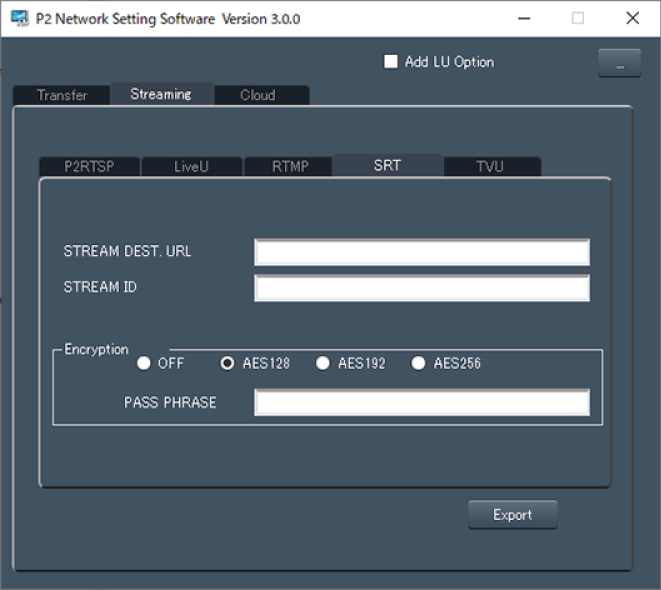
-
Start the P2 Network Setting software.
-
Select the “Streaming” tab
“SRT” tab.
-
Enter the destination URL in “STREAM DEST. URL”.
-
Enter the stream ID in “STREAM ID”.
-
When encrypting, select “Encryption” and enter “PASS PHRASE”.
-
Click “Export” and select the destination in the drive selection dialog, and then click “OK”.
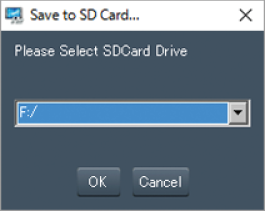
This cannot be saved to anything other than a removable drive.
|
|
Menu Items Added
[NETWORK] menu
[STREAMING]
[STREAMING PROTOCOL]
Specifies the streaming protocol.
|
[RTMP(S)] |
Streams in RTMP or RTMPS. |
|
[RTSP] |
Streams in RTSP. |
|
[SRT CLIENT] |
Streams in the SRT client mode. |
|
[SRT LISTENER] |
Streams in the SRT listener mode. |
(Factory setting: [RTSP])
[SRT SETTING]
[DEST URL]
Specify the destination URL when in client mode.
[STREAM ID]
Set the stream ID when in client mode.
[PORT]
Specify the standby port when in listener mode.
(Factory setting: [2020])
[TTL/HOP LIMIT]
Sets the TTL/HOP limit value.
The items that can be selected are as follows.
[1]...[255]
(Factory setting: [254])
[LATENCY]
Sets the time (ms) between when packets are sent and when they are played on the receiving side.
(Factory setting: [120])
[ENCRYPTION]
Sets the encryption for streamed IP video.
(Factory setting: [OFF])
[PASSPHRASE]
Sets the phrase for decoding encrypted IP video.