
Synchro Scan Functions Added
Synchro Scan Functions have been added.
Synchro scan shutter speed
Fine-adjusting the shutter speed will minimize flickering and horizontal bars in images.
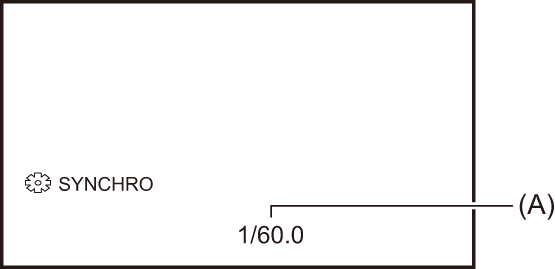
(A) Synchro scan shutter speed
-
Switch to manual mode with the <AUTO/MANU> switch.
-
Press the <SHUTTER> button to switch to manual shutter mode.
The shutter speed display is highlighted in orange.
-
Select [SCENE FILE] menu
 [SYNC SCAN] [ON].
-
Adjust the Synchro Scan setting by rotating the multidial.
To minimize flickering and horizontal bands, look at the screen while adjusting the shutter speed.
-
Press the multidial.
The setting changes to the value displayed and exits.
Press the <EXIT> button to exit without changing the setting.
 The set shutter speed will also be applied to the [SCENE FILE] menu [SYNC SCAN SETTING] menu setting.
|
– Switch to auto shutter mode. – Adjust the shutter speed to 1/50, 1/60, or 1/100. – Adjusting with the synchro scan shutter speed |
Multi manual function added
[ SYNCHRO] is now available with the multi manual function.
It is possible to switch to [ SYNCHRO] with a multidial operation by making the following setting. ( Multi manual function)
Set to manual shutter mode and set [SYNC SCAN] to [ON].
Menu Items Added
 [SCENE FILE] menu
|
|
[SYNC SCAN]
Sets enable/disable of the synchro scan shutter.
The items that can be set are as follows.
 [ON], [OFF]
[SYNC SCAN SETTING]
Displays the speed of the synchro scan shutter that is used when shooting video for television etc.
The items that can be set are as follows.
|
Frame rate of the recording format |
Setting value |
|
59.94p/59.94i |
[1/60.0]…[1/250.0] |
|
29.97p |
[1/30.0]…[1/250.0] |
|
23.98p |
[1/24.0]…[1/250.0] |
|
50.00p/50.00i |
[1/50.0]…[1/250.0] |
|
25.00p |
[1/25.0]…[1/250.0] |
|
– When the <AUTO/MANU> switch is set to <MANU> – When the manual shutter mode is set – When the [SCENE FILE] menu – Flash band compensation function is disabled |