
Extended Functions
 [ARRI LogC3] Has Been Added as a Photo Style
[LUT Select(ARRI LogC3)] Added to [Log View Assist]
[ARRI 709] Added to the [LUT Library]
This section explains the extended functions that become available by using an Upgrade Software Key (DMW-SFU3A: optional).
[ARRI LogC3] Has Been Added as a Photo Style
It is now possible to select [ARRI LogC3] from [Photo Style].
This can only be selected in [ ]/[S&Q] mode with [Rec. File Format(Video)] set to [MOV] or [Apple ProRes].

 [
[ ] [
] [ ] Select [Photo Style]
 [ARRI LogC3]
A setting for log video that conforms to the EI800 gamma curve from the LogC3 specification offered by ARRI ( Log Recording)
 It allows the production of images rich in gradation through post-production techniques.
|
– Cannot record with the [MP4] recording quality. – Cannot record with the [MOV] [420/8-L] recording quality. – Cannot record with the [Apple ProRes RAW HQ]/[Apple ProRes RAW] recording quality. – ISO sensitivity is restricted to a lower limit of 500 and an upper limit of 51200. – The luminance level setting is fixed to [64-940]. – [L] in [Proxy Rec. Quality] is not available. – [Master Pedestal Level] is not available. – [i.Dynamic Range] is not available. – The only image quality adjustments available are [Sharpness] and [Noise Reduction].
#LUMIXPHOTOSTYLE LOGC3: [ARRI LogC3] |

Log Recording




Setting [Photo Style] to [ARRI LogC3] enables Log recording.
Images finished with rich gradation can be created through post-production processing.
-
Set to [
] or [S&Q] mode.
-
Set [Rec. File Format(Video)] to [MOV] or [Apple ProRes].
[] [ ] [Rec. File Format(Video)] [MOV]/[Apple ProRes]
-
Select the video image quality with which [ARRI LogC3] can be used.
[] [] [Rec Quality]
-
Select [ARRI LogC3].
[] [] [Photo Style] [ARRI LogC3]
|
Download the LUT file for [ARRI LogC3] from the following: (1) ARRI Look Library (LogC3-to-Rec709) A LUT file with the ARRI Look File applied for the Rec.709 color space. There are 87 types of Look Files, providing you with a great variety. (As of June 2025) (2) ARRI Look Library (log-to-log) A LUT file for applying Looks with the Log space as is with its rich color information. Similarly to (1), there are 87 types of Look Files, providing you with a great variety. (As of June 2025) (3) ARRI LogC3 LUT Package A LUT file for converting from ARRI LogC3 to the color spaces of a variety of display devices. By going through (2) ARRI Look Library (log-to-log), it is possible to produce the Look according to the color space you are aiming for. Refer to the following site for information regarding ARRI Look Files: https://www.arri.com/en/learn-help/learn-help-camera-system/image-science/look-files |

 ISO Sensitivity When [ARRI LogC3] Is Set
The lower limit of available ISO sensitivity is [500], and the upper limit is [51200].
Reset the exposure if necessary when ISO sensitivity changes.
ISO Sensitivity When [Dual Native ISO Setting] Is Set
[AUTO]: Base sensitivity: 500 / 3200 (dB display values are based on 500)
AUTO / 500 to 51200
[LOW]: Base sensitivity: 500
AUTO / 500 to 4000
[HIGH]: Base sensitivity: 3200
AUTO / 3200 to 51200
Exposure When [ARRI LogC3] Is Set
The log characteristics of [ARRI LogC3] comply with 800 ASA (EI 800), described in “ARRI_ALEXA_LogC_Curve_in_VFX.pdf” released by ARRI. The log characteristics of [ARRI LogC3] on this camera do not depend on the ISO sensitivity settings.
However, according to the Exposure Stops values defined in 800 ASA (EI 800), there will be the equivalent of 1.3 stops worth of clipping.
Refer to the following for “ARRI_ALEXA_LogC_Curve_in_VFX.pdf”:
Diagram of the log characteristics of [ARRI LogC3] on this camera
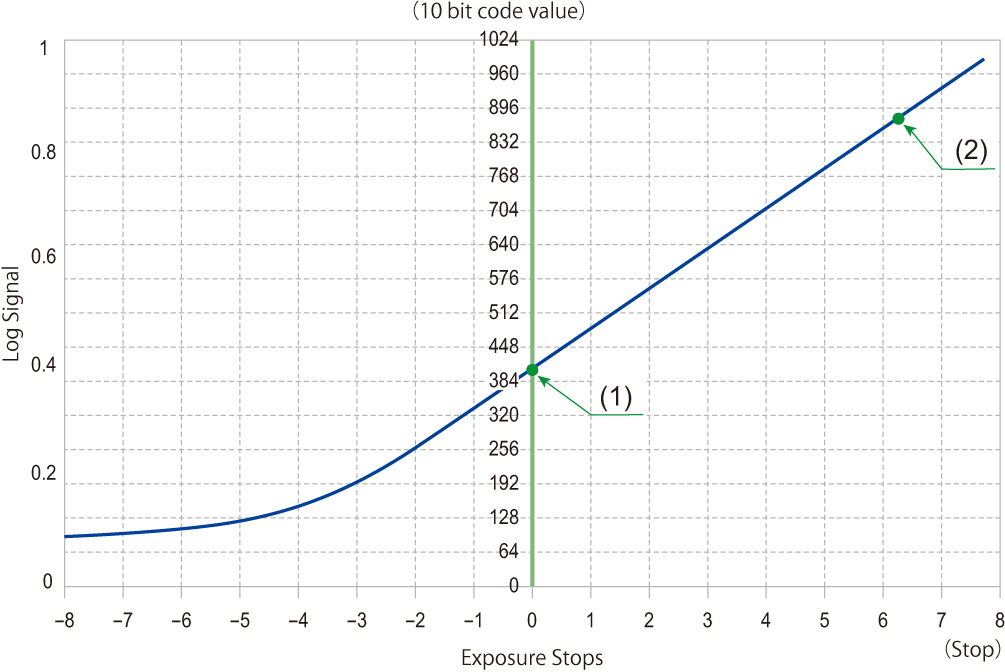
(1) 18 % gray
(2) Clipping level
When the [Photo Style] is set to [ARRI LogC3] or [REAL TIME LUT] (base Photo Style is [ARRI LogC3]), the [Luminance Level] is fixed to [64-940] (video range).
The recorded data is recorded as video range.
HDMI output is output as video range.
The waveform and vector scope are both displayed as video range.
The luminance spot meter displays the 18 % gray output level as 0 Stop.
[LUT Select(ARRI LogC3)] Added to [Log View Assist]
You can now select [LUT Select(ARRI LogC3)] in [Log View Assist].
[ ] [
] [ ] Select [Log View Assist]
[LUT Select(ARRI LogC3)]
Selects the LUT file to apply from a preset or LUT files registered in [LUT Library]. ([LUT Library])
|
|
[ARRI 709] Added to the [LUT Library]
[ARRI 709] has been added as a sample LUT in the [LUT Library].
[] [] [LUT Library] Select [ARRI 709]
|
|