
Cautions for Use
 The Camera
Keep this unit as far away as possible from electromagnetic equipment (such as microwave ovens, TVs, video games etc.).
 If you use this unit on top of or near a TV, the pictures and/or sound on this unit may be disrupted by electromagnetic wave radiation.
Do not use this unit near cell phones because doing so may result in noise adversely affecting the pictures and/or sound.
Recorded data may be damaged, or pictures may be distorted, by strong magnetic fields created by speakers or large motors.
Electromagnetic wave radiation may adversely affect this unit, disturbing the pictures and/or sound.
If this unit is adversely affected by electromagnetic equipment and stops functioning properly, turn this unit off and remove the battery or disconnect AC adaptor. Then reinsert the battery or reconnect AC adaptor and turn this unit on.
Do not use this unit near radio transmitters or high-voltage lines.
If you record near radio transmitters or high-voltage lines, the recorded pictures and/or sound may be adversely affected.
Do not extend the cords or the cables.
Do not spray the camera with insecticides or volatile chemicals.
If the camera is sprayed with such chemicals, the body of the camera may be damaged and the surface finish may peel off.
Do not keep products made of rubber, PVC or similar materials in contact with the camera for a long period of time.
Cleaning
Before cleaning the camera, remove the battery or the DC Coupler, and disconnect the power plug from the electrical outlet. Then wipe the camera with a dry, soft cloth.
When the camera is soiled badly, it can be cleaned by wiping the dirt off with a wrung wet cloth, and then with a dry cloth.
Do not use solvents such as benzine, thinners, alcohol, kitchen cleansers, etc., as there is a possibility that these can deform the surfaces of the camera, such as those of the external case and the mount, or cause peeling of the coatings.
When using a chemical cloth, be sure to follow the accompanying instructions.
Cleaning the Viewfinder
If the viewfinder becomes dirty, blow dirt off the surface of the viewfinder using a commercially available blower, then lightly wipe with a soft dry cloth.
Monitor/Viewfinder
Do not push hard on the monitor.
This may cause irregular coloration or malfunction.
Extremely high precision technology is employed to produce the monitor/viewfinder screen. However there may be some dark or bright spots, or spots that light constantly (red, blue, or green) on the screen.
This is not a malfunction.
Though the monitor/viewfinder screen parts are produced with highly controlled precision technology, some pixels may be inactive or always lit.
The spots will not be recorded on images on a card.
Lens
Do not press the lens with excessive force.
Images may appear slightly white if lens is dirty (fingerprints, etc.). Turn the camera on, hold the extracted lens barrel with your fingers, and gently wipe the lens surface with a soft, dry cloth.
Do not leave the camera with the lens facing the sun as rays of light from the sun may cause it to malfunction. Also, be careful when placing the camera outside or near a window.
Battery
The battery is a rechargeable lithium ion battery.
It is highly sensitive to temperature and humidity, and the effect on performance increases as the temperature rises or drops.
Do not let the battery terminals (A) become soiled.
Wipe with a dry cloth if they become soiled.
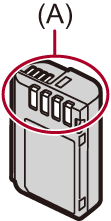
Always remove the battery after use.
Place the removed battery in a plastic bag, etc., and keep away from metallic objects (clips, etc.) for storage or transport.
If you drop the battery accidentally, check to see if the body of the battery and the contacts are deformed.
Damage to the camera will result if a battery with deformed contacts is inserted into the camera.
Dispose of unusable battery.
The battery has a limited life.
Do not throw the battery into fire because it may cause an explosion.
Do not allow battery terminals to come into contact with metal objects (such as necklaces, hairpins, etc.).
This can cause short-circuiting or heat generation and you may be badly burned if you touch a battery.
Card
Do not leave the card in areas with high temperatures, direct sunlight, or areas prone to electromagnetic waves and static.
Do not bend or drop the card.
Do not subject the card to strong vibration.
Otherwise, the card and recorded data may be damaged.
Put the card in the card case or the storage bag after use and when storing or carrying the card.
Do not allow dirt, water or other foreign objects to get into the contacts on the card.
Additionally, do not touch the contacts with your hands.
Personal Information
Personal information is stored within the camera and in recorded images.
We recommend that you enhance security by setting the Wi-Fi function lock to protect personal information. ( [Wi-Fi] Menu)
Images may contain information that can be used to identify the user, such as recording dates and times, and location information.
Avoid using passwords that may be easily guessed by someone else, such as birthdays, etc.
Use a different password to the passwords you have used for services provided by other companies.
Disclaimer
Information including personal information may be altered or vanish due to erroneous operation, effect of static electricity, accident, malfunction, repair, or other handlings.
Please note in advance that Panasonic is not liable in any way for any direct or indirect damage from the alteration or vanishing of information or personal information.
When requesting a repair or transferring/disposing of the camera
After making a copy of personal information, be sure to delete information, including personal information, such as wireless LAN connection settings that you have registered or saved within the camera with [Reset] ([Reset]).
Reset the settings to protect the personal information. ([Reset])
Remove the card from the camera.
Settings may return to factory default when camera is repaired.
Please contact the dealer where you purchased the camera or Panasonic if above operations are not possible due to malfunction.
Points to remember when disposing of/transferring the memory card
Format or delete using the camera or a PC will only modify the file management information, so it will not delete the data in the card completely.
We recommend physically destroying the card or using commercially available PC data deletion software to delete the card data completely when disposing of/transferring the card.
You are responsible for handling of data on cards.
When Not Using the Camera for a Long Period of Time
Ensure you remove the battery and card from the camera.
If the battery is left in the camera, it may over-discharge, and be rendered unusable even after charging.
Store the battery in a cool and dry place with a relatively stable temperature.
(Recommended temperature: 15  C to 25 C (59 F to 77 F); recommended humidity: 40 %RH to 60 %RH)
If storing for a long period of time, it is recommended that the battery be charged once per year, fully drained in the camera, then removed from the camera and then stored again.
We recommend storing the camera with a desiccant (silica gel) when you keep it in a closet or a cabinet.
Check all the parts before recording when you have not used the camera for a long period of time.
Image Data
Recorded data may be damaged or lost if the camera breaks down due to inappropriate handling.
Panasonic will not be liable for any damage caused due to loss of recorded data.
Tripod/Unipod
When you use a tripod, make sure the tripod is stable when the camera is attached to it.
You may not be able to remove the card or the battery when using a tripod or unipod.
Care is required because tightening the screw excessively may damage the camera.
Please also carefully read the operating instructions for the tripod/unipod.
Lens Cloth (Supplied with the -N Model)
Avoid keeping the cloth in places exposed to direct sunlight for long periods as this can lead to fading.
Wi-Fi Function
Use the camera as a wireless LAN device.
When using devices or computer systems that require more reliable security than wireless LAN devices, ensure that the appropriate measures are taken for safety designs and defects for the systems used.
Panasonic will not take any responsibility for any damage that arises when using the camera for any purpose other than as a wireless LAN device.
Use of the Wi-Fi function of the camera is presumed to be in countries where it is sold.
There is the risk that the camera violates the radio wave regulations if used in countries other than those where it is sold, and Panasonic takes no responsibility for any violations.
There is the risk that data sent and received via radio waves may be intercepted.
Please note that there is the risk that data sent and received via radio waves may be intercepted by a third party.
Do not use the camera in areas with magnetic fields, static electricity or interference.
Do not use the camera in areas with magnetic fields, static electricity or interference, such as near microwave ovens.
These may cause the interruption of the radio waves.
Using the camera near devices such as microwave ovens or cordless telephones that use the 2.4 GHz radio wave band may cause a decrease in performance in both devices.
Do not connect to the wireless network you are not authorized to use.
When using Wi-Fi, wireless networks (SSID) that you are not allowed to use may be displayed, but you should not connect to these as it may be viewed as unauthorized access.