
Shooting
For shooting, use the following steps.
 To use the REC button (on the handle) and tally lamp, attach the handle unit (supplied) to the unit.
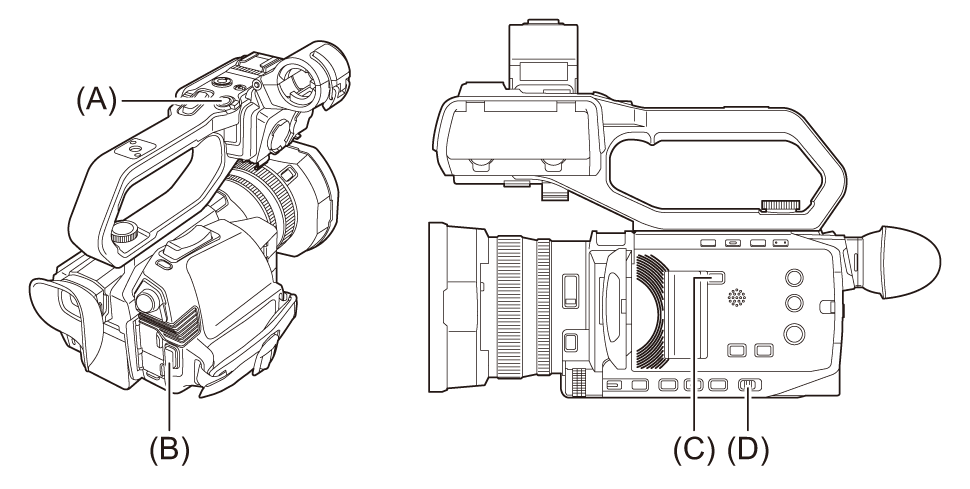
(A) REC button (on the handle)
(B) REC button (on the grip)
(C) <SLOT SEL> button
(D) <AUTO/MANU> switch
-
Make settings before recording.
Before shooting, the followings must be set or adjusted.
– Image settings for the brightness function (iris, gain, shutter) and the white balance adjustment function, etc.
– Audio input settings for audio recording.
– Adjusting audio recording level
Press the <SLOT SEL> button to select the memory card to record to.
-
Select shooting mode with the <AUTO/MANU> switch.
-
Start the recording by pressing the REC button.
One REC button is located on both the handle and the grip.
The tally lamp is illuminated in red while recording. ( Tally lamp)
-
Press the REC button again to stop.
 About the screen displays during recording
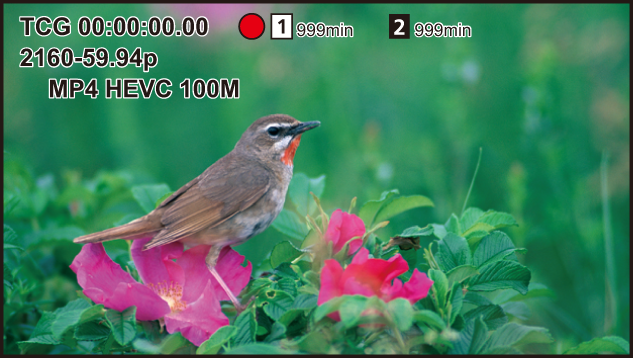
[TCG 00:00:00.00]:
Time data (Setting of time data)
[ ]/[
]/[ ]:
]:
Card slot number (recording target)
 is displayed on the left during recording.
[ ]/[
]/[ ]:
]:
Card slot number
[999min]:
Remaining recording capacity in the memory card
The display flashes when the remaining recording capacity falls below 2 minutes.
[2160-59.94p]:
Resolution, frame rate (Selecting the resolution, codec, and frame rate for recording video)
[MP4 HEVC 100M]:
File format, recording format (Selecting the resolution, codec, and frame rate for recording video)