
[LUT Library] Function Has Been Enhanced
It is now possible to load the LUT file image quality adjustment information with the camera and make settings.
 Also read “Base Photo Style of LUT files”. (
 Base Photo Style of LUT files)
Refer to the following for how to assign image quality adjustment information to a LUT file you have created (“.cube” format only).
For example: LUT file (“.cube” format)
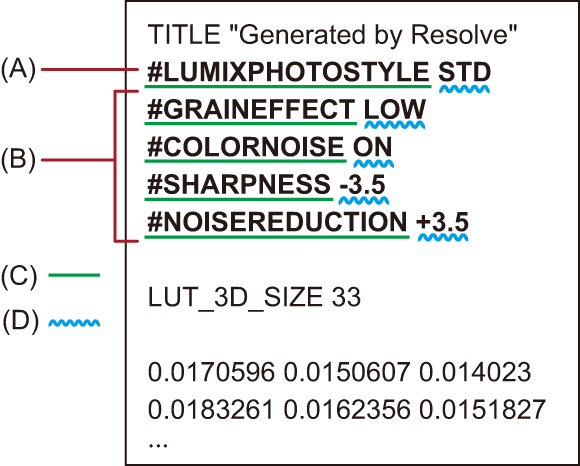
(A) Photo Style information
(B) Image quality adjustment information
(C) Identifier tag
(D) Setting value
A half-width space is required between the identifier tag and the setting value.
If the Photo Style information is absent or if it is not set correctly, [V-Log] is used as the base Photo Style.
Image quality adjustment information cannot be loaded if there is no Photo Style information.
The image quality adjustment information and setting values that can be set
Below describes the identifier tags and setting values you can add to image quality adjustment information.
The setting values that can be included are ones that are recognizable by both the camera and LUMIX Lab, and these are detected when the LUT file is loaded.
When a LUT file with LUMIX Lab setting values included is loaded onto the camera, the setting values of the camera are loaded according to the chart below.
(A) Base Photo Style is other than [V-Log]
(B) Base Photo Style is [V-Log]
[Color Noise] is not applied if the base Photo Style is the following:
– [Monochrome]/[L.Monochrome]/[L.Monochrome D]/[L.Monochrome S]/[LEICA Monochrome]
|
However, with [RAW Processing], if the applied LUT file base Photo Style is different from the base Photo Style during recording, the image quality adjustment information may not be reflected. |
