
[Focus Stacking]





The camera records while automatically changing the focus point to compose an image with focus across a broad range.
Times you might find this feature convenient are when you want to get close to the subject and make it a feature of your shot but also want to have a deep depth of field, or when you want to take pictures of scenery where there is a clear separation between the foreground and background.
|
|

-
Set to [
 ] mode.

-
Set [Focus Stacking].


 [
[ ] [
] [ ] [Focus Stacking]
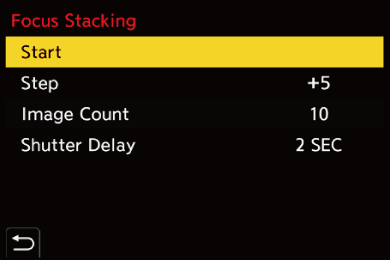
[Start]
Starts recording with focus stacking.
[Step]
Sets the focus adjustment step.
 The distance that the focus point is moved becomes shorter if the initial focus point is close, and longer if it is far away.
[Image Count]
Sets the image count.
The number of images actually taken may be fewer than the number of images set to be recorded. Furthermore, not all of the images recorded are always used when merging the images.
[Shutter Delay]
Sets the delay time from when the shutter button is pressed until the shutter is released.
-
Start [Focus Stacking].
Select [Start] and then press .
-
Start recording.
Press the shutter button fully.
Records while shifting the focus point backward and forward, using the focus point when recording starts as the reference.
The merging is performed after recording. Depending on the recording conditions and the number of pictures taken, image merging may take some time.
-
End [Focus Stacking].
Press [Q].
|
– [Shutter Type]: [ELEC.] (When [Long Exposure NR] is set to [OFF])/[ELEC.+NR] (When [Long Exposure NR] is set to [ON])
– [Rec. File Format(Photo)]: [JPEG]/[RAW+JPEG]/[RAW] Saved in the JPEG format – [Rec. File Format(Photo)]: [HEIF]/[RAW+HEIF] Saved in the HEIF format
|

 ). (Except for merged images) (